Many companies deploy the infrastructure for their applications in Azure Cloud. They want this process to be efficient and reusable. For this purpose, they use an Infrastructure‑as‑Code (IaC) tool named Terraform. Terraform automates the provisioning of cloud infrastructure.
Terraform automates infrastructure deployment. GitOps adds an automated workflow that integrates this deployment into a Git flow. Without GitOps, teams must run Terraform manually. In some cases, teams even use the Azure Portal UI without Terraform. Each team works differently, and it is difficult to track changes made by others. This creates fragmented methods across projects. As a result, making changes requires complex context‑switching, extra communication, and continuous updates to documentation.
What is Terraform?
Terraform uses the Terraform workflow to deploy infrastructure in a declarative way. You define the required cloud resources in configuration files, and Terraform provisions these resources. The main benefit of Terraform is that it provides consistent, reusable, and version‑controlled infrastructure for many teams and projects. This makes large‑scale infrastructure predictable, reliable, and easier to manage.
This capability makes it possible to implement a standardized Git‑flow pipeline infrastructure by using a reusable Terraform module. Each project can include this module as a sub‑module. The module follows the latest industry standards for Terraform module development. It also follows the AVM standards, which define how Terraform modules must be implemented for Azure.
A standardized Terraform Git‑flow with clean coding principles provides safe, consistent, automated, and scalable infrastructure management. It improves collaboration, reduces errors, and enforces governance across all teams.
Terraform Sub-module
Modules are always defined using Module HCL blocks from within other Terraform configurations. Required input variables are defined from within this module block. The source-code for this module can be found here. With a Sub-module, infrastructure is provisioned in the Cloud.
Before reaching Azure, the Terraform modules goes through multiple layers.
- A project root-module manages Azure Infrastructure through Terraform
- Our Module gets added as a sub-module dependency within that config.
- Then converts our HCL, through the providers (AzureRM, AzAPI, AzDevOps) to interpretable API calls for the Azure Resource Manager and API endpoints.
- to in turn make modifications to the Azure Infrastructure within the given scope.
The following services are created and configured.
- A service connection within DevOps
- A service principal and federated identity
- Storage Container for remote state storage
- App Configuration for remote backend configuration (tfvars)
- Managed DevOps Pool for pipeline agents
- A Key vault linked to the App Config
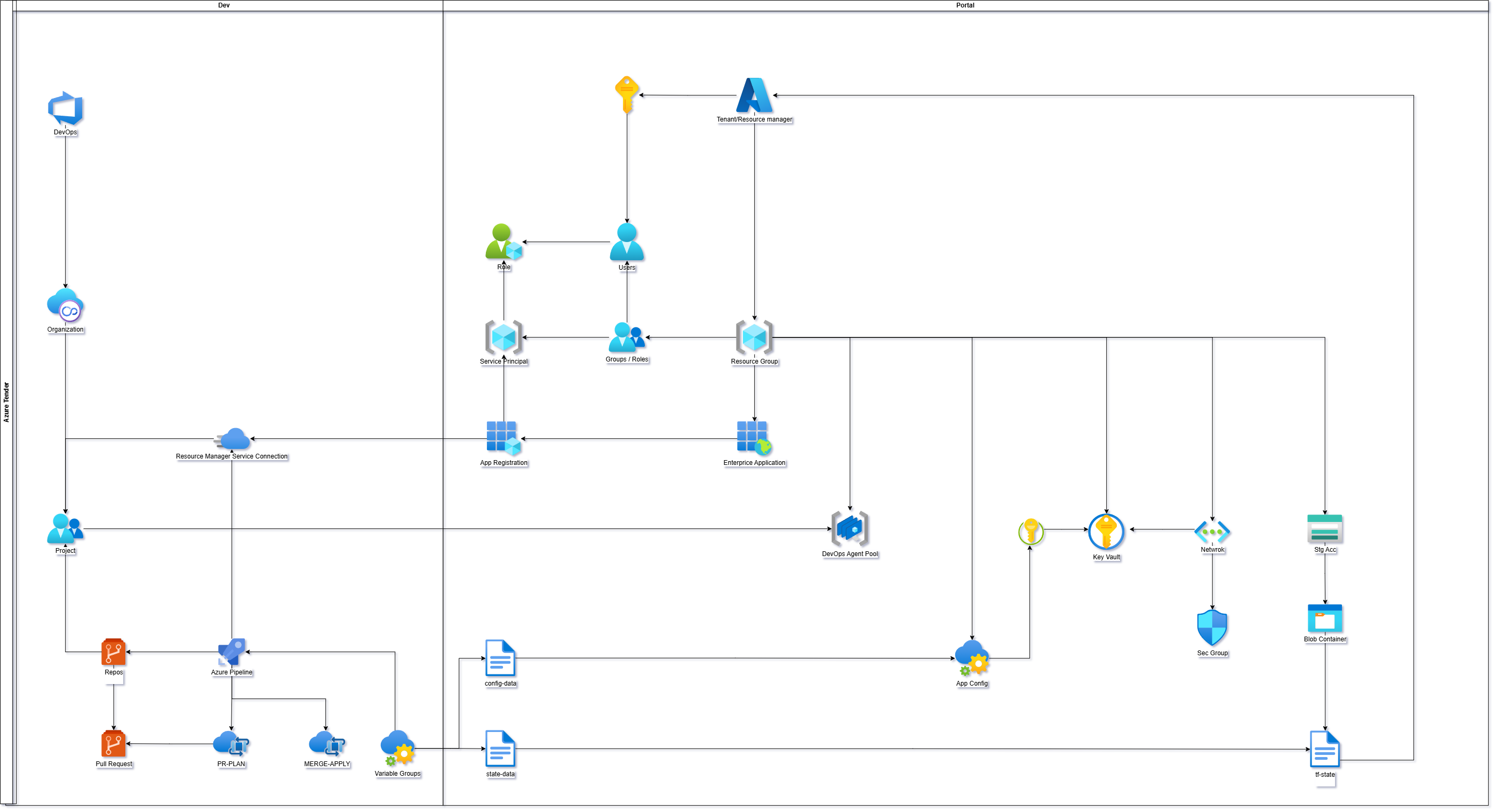
Azure Git Ops
After you implement the module that provisions the infrastructure for Git automation, you must create the Git‑automation pipeline configurations in Azure DevOps. These pipeline configurations run on the provisioned infrastructure.
To start, each pipeline configuration must follow the DRY principle and the SOLID principle (specifically the Open/Closed Principle). These principles prevent a project with many environments from creating complex and nested pipeline structures. The pipelines use dynamic variables. You can override these variables to support multiple environments.
This design uses two pipelines: PR Plan and Merge Apply. Both pipelines are in the pipelines folder.
The PR Plan pipeline creates a Git flow. This flow triggers a Terraform task. The task generates a Terraform plan based on the pull‑request source code.
The Merge Apply pipeline uses the plan from the PR Plan pipeline. It applies the plan and provisions the infrastructure in the target environment.
With this workflow, you do not need to use the Terraform CLI on your local machine. You only create a pull request with the required changes. The pipelines execute all provisioning tasks.
How they come together
Both pipelines operate on the Managed DevOps Pool. This pool is provisioned by the module. The pipelines use OIDC authentication through a federated identity. This method uses the trust of internal Azure IAM. It removes the need for local tokens and makes authentication easier to maintain.
The pipelines use Terraform extension tasks together with the Azure CLI and Git CLI. Inside each pipeline, the App Configuration (provisioned by the module) provides the Terraform input variables. These variables are fetched dynamically. The pipelines also initialize the remote Terraform backend by connecting to the Storage Container. This Storage Container is provisioned by the module. You must migrate the backend manually one time during first use.
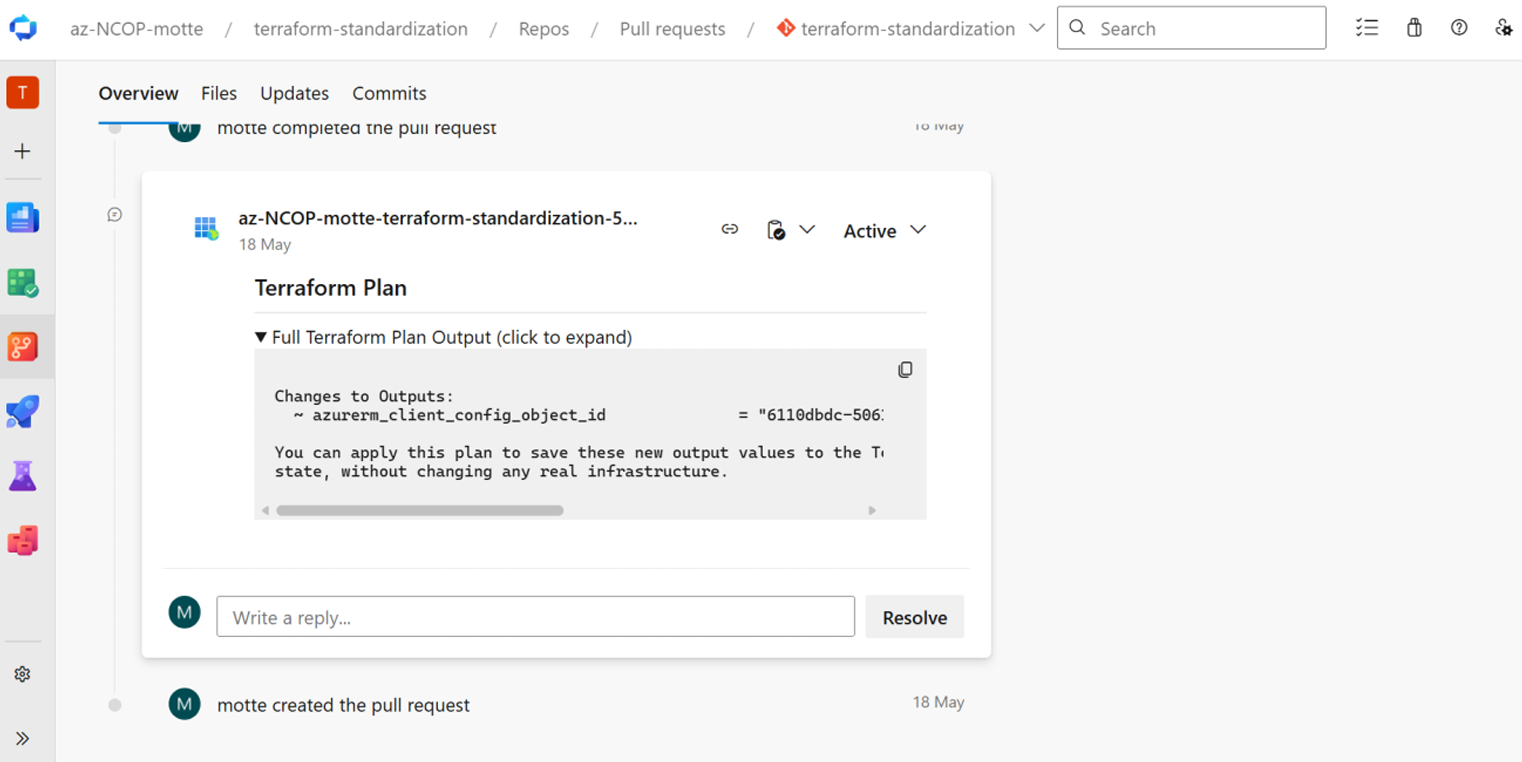
In conclusion, this GitOps flow creates automated documentation for infrastructure changes through Azure DevOps pull requests and approvals. When a pull request contains changes to a Terraform configuration, the PR Plan pipeline compares the changes and adds comments in the pull request. After review and approval, the Merge Apply pipeline applies the changes in the live environment.